Send an answer to a topic: Site updates
antp
It is a matter of habit I suppose, I do it in a similar way with keyboard without the mouse.
But changing habits is difficult
In Firefox I assigned the shortcut key to Alt instead of Alt+Shift.
And each field as a letter assigned, so it allows to go directly to a field with Alt+letter.
year = n
make = n
model = d
extra = x
chassis = c
mk = m
class = a
origin = o
madein = b (built in)
madefor = f
episode = e
important = r (role)
timecode = t
save/submit = s (in all the forms)
There are also shortcuts for many admin links
But changing habits is difficult
In Firefox I assigned the shortcut key to Alt instead of Alt+Shift.
And each field as a letter assigned, so it allows to go directly to a field with Alt+letter.
year = n
make = n
model = d
extra = x
chassis = c
mk = m
class = a
origin = o
madein = b (built in)
madefor = f
episode = e
important = r (role)
timecode = t
save/submit = s (in all the forms)
There are also shortcuts for many admin links
andyhao
I guess I'm already used to the collaboration between a keyboard in one hand and a mouse in the other. 😀
It really works faster for mass upload or update for me.
I think videos show clearly
Chrome (also before Brave update their browser): https://myppt.cc/YbwLj
Brave now: https://myppt.cc/J9mju
It really works faster for mass upload or update for me.
I think videos show clearly
Chrome (also before Brave update their browser): https://myppt.cc/YbwLj
Brave now: https://myppt.cc/J9mju
antp
But do you really need to have the selected entry under the mouse cursor?
Once you have the right one selected with keyboard, you can just press Enter or Tab to validate the selection.
I often don't use the mouse at all, going throw the fields with Tab, then type the first characters of the country, sometimes press one or two times the "down" arrow for countries where many have the first same letter, then Tab for the next field.
I use only Firefox.
Once you have the right one selected with keyboard, you can just press Enter or Tab to validate the selection.
I often don't use the mouse at all, going throw the fields with Tab, then type the first characters of the country, sometimes press one or two times the "down" arrow for countries where many have the first same letter, then Tab for the next field.
I use only Firefox.
andyhao
As this is not something that the site handles, if there is a behavior change it may be due to an update of your browser.
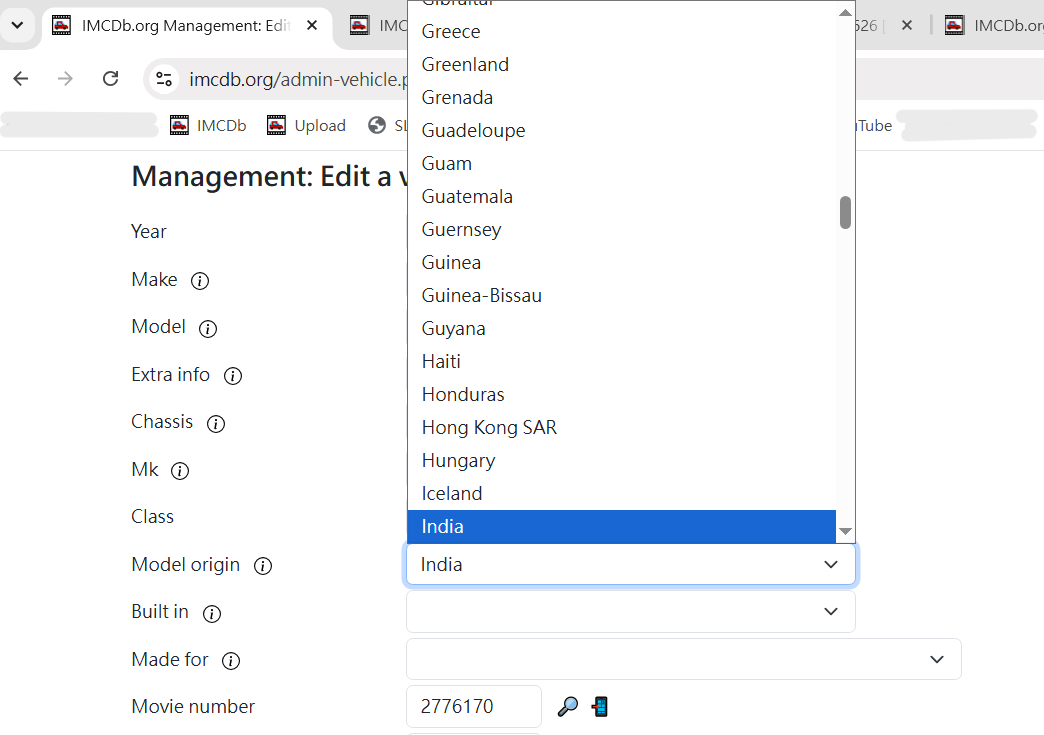
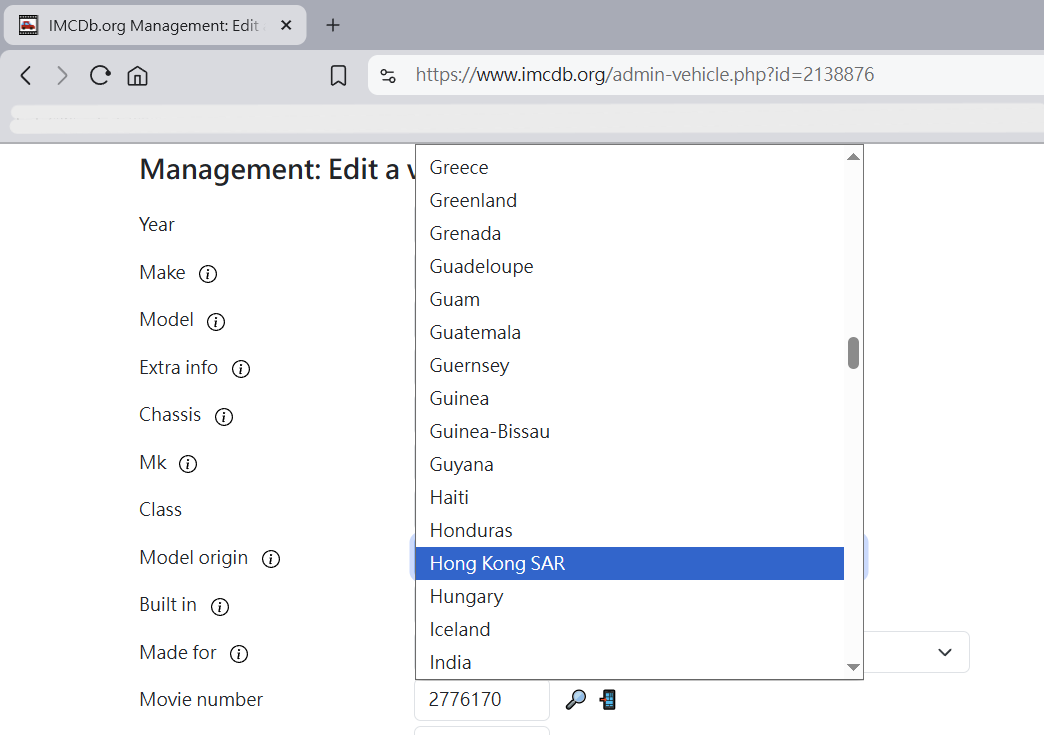
Ahh, yes. You're right, Brave must have changed something. The situation I encounter did not happened on Chrome.
I'm not sure how to describe the differences precisely in English, but I know it's my browser's problem now, also which is why I couldn't enter data smoothly.
Using this page for example: https://www.imcdb.org/vehicle.php?id=2138876
Chrome:
Brave:
Looks like I should switched back to Chrome for now 😢
I chose Brave because it didn't use so much CPU like Chrome.
antp
That part hasn't changed: before and now the countries list have always been just plain basic/standard drop-down lists (unlike the makes list which is something specific managed by the site).
As this is not something that the site handles, if there is a behavior change it may be due to an update of your browser.
One thing that can have an influence: now that the update history is displayed below all these fields, the page is longer, this can maybe in some cases modify the behavior?
As this is not something that the site handles, if there is a behavior change it may be due to an update of your browser.
One thing that can have an influence: now that the update history is displayed below all these fields, the page is longer, this can maybe in some cases modify the behavior?
andyhao
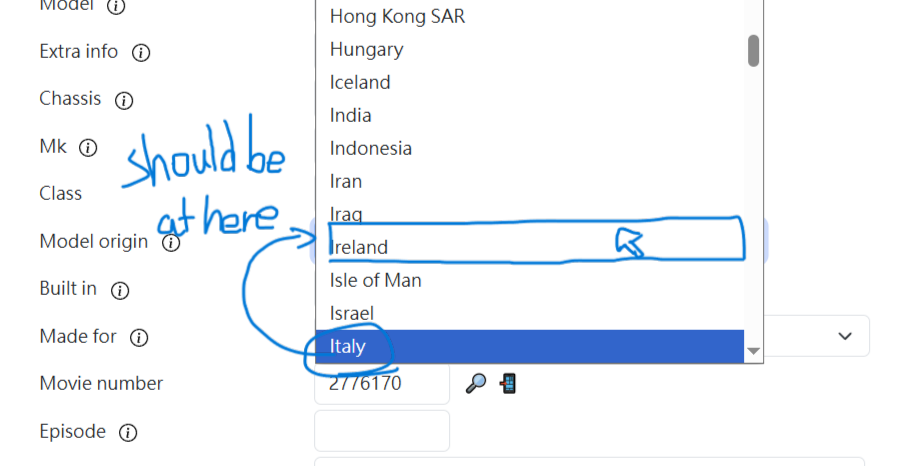
I remembered before the update, if hovered my mouse in the middle of the section (For example: Model origin:) and type the first one or three letters of the country name (For example: Ita) , the first country that matched the letters should be right at where my mouse hover at. 
antp
Small update for two new features:
- improvements in the links detection, hoping it does not break anything, to avoid too long links displayed when posting a link to an advanced search
- vehicle change history (visible only by admins)
Please report here any error (or strange new behavior) that you encounter.
- improvements in the links detection, hoping it does not break anything, to avoid too long links displayed when posting a link to an advanced search
- vehicle change history (visible only by admins)
Please report here any error (or strange new behavior) that you encounter.
antp
I found a bug, that I just fixed: when editing vehicle info, the owner preciously set was lost.
I don't know since when there is this bug, but it is annoying, since possibly some owner that were linked to vehicles were accidentally removed.
If you notice one missing, don't hesitate to mention it in the comments on the site, or here.
edit: I restored a few by comparing the list of owners with previous copies of the database, there may still be some missing.
I don't know since when there is this bug, but it is annoying, since possibly some owner that were linked to vehicles were accidentally removed.
If you notice one missing, don't hesitate to mention it in the comments on the site, or here.
edit: I restored a few by comparing the list of owners with previous copies of the database, there may still be some missing.
antp
Indeed, it seems that you are the first one to try the functionality since last month 
It has worked at some point, I probably changed something since my last test and the moment I've put it online.
Until I fix this, you can get the "Sort by count" working if you enable the option to display the count also.
It has worked at some point, I probably changed something since my last test and the moment I've put it online.
Until I fix this, you can get the "Sort by count" working if you enable the option to display the count also.
Error101lol
The list won't work. It can't sort by count, because of an unknown parameter?